
¶ VATITA Controller Plugin
Welcome to the VATITA Controller Plugin, developed to enhance the realism of your EuroScope Italian ATC experience with new features, tag items, automation tools, and more.
¶ ✈️ Main Features
- Custom Tag Items: The plugin provides realistic dynamic TagItems for Integrated Labels.
- Rotating Items: Rotating label items (AHDG, SPD, EFX) triggered by mouse or keyboard interactions.
- Macro Label Support: Macro-Label allows controllers to see all needed information about an aircraft and its flightplan, as well as interact to change its assigned STAR, arrival RWY, RFL, etc.
- Mode-S Integration: Calculated heading, Mach number and IAS through the use of IASSure.
- OWN integration: shows the ID of the ATC sector in control of the aircraft next to the aircraft’s track
- Custom UIs for better realism: The new custom UIs allow rapid interactions with the system and easy access to useful airport information (i.e. transition level, QNH)
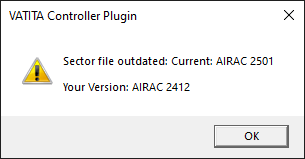
- Sectorfile Version Checker: Checks your sectorfile version and notifies you through a pop-up window when an update is available.
- Auto-Updates: The plug-in automatically downloads new plug-in updates when available and prompts you to restart Euroscope to install them.
¶ ⚙️ Installation
The plugin is included in the sectorfile and loaded by default.
¶ If a manual installation is needed:
- Download
VCP.dllfrom our CDN. - Place the downloaded file in
Euroscope\LIXX\Plugins\VATITA Controller Plugin - In EuroScope, go to
Other SET > Plug-inand loadVCP.dll.
When installing, make sure you are not connected to the network. Unloading and re-loading the plugin while connected to VATSIM may lead your EuroScope to an unexpected crash.
You’re all set!
¶ 🏷️ Custom TagItems
| TagItem | Description |
|---|---|
| AHDG | Displays heading or direct-to point, outbound/inbound coordination depending on assignment. Used in detailed level. |
| AHDG (unselected) | Same as AHDG, but abbreviates waypoints to the first 3 letters. For tagged level. |
| EFX | Shows the last 2 letters of destination airports in Italy and LSZA (e.g., LIMC → MC). Also displays FIR exit point or the relevant FRA gate when no destination airport is to be displayed. Tagged level only. |
| EFX (detailed) | Same as EFX, for detailed view. |
| RWYDESIG | Displays the runway assigned to the aircraft, whether the “left” or “right” (L or R) for LIRF and LIMC. |
| WTC | Aircraft Wake Turbulence Category with color coding: L → Green, M → White, H/J/757 → Orange |
| SPD | Shows GS, assigned speed/mach, and real-time calculated IAS or mach number. For detailed view.* |
| SPD (unselected) | Same as SPD, for tagged level. |
| ALV | Allows to set and shows the assigned altitude or flight level. |
| LVL | Shows the current altitude or flight level transmitted by the aircraft. |
| xfl | Shows the FLAS to the next sector if one is available in the relevant agreement (LoA) or has been coordinated. Allows to coordinate a FLAS with the next sector. |
| AVR | Shows the current vertical rate. When a vertical rate is assigned, shows the assigned rate in detailed view and the current rate in tagged view. |
| Vertical speed indicator | Shows the aircraft’s vertical speed in climb & descent |
| nxs | Shows the next sector to which the aircraft will be handed off to |
More info here
Based on the position you are controlling EFX also displays the last 2 letters of the destination when the airport is outside the national border, if it has a FLAS in one of the existing standing agreements (LOAs).
¶ 🔁 Rotating Items (AHDG / SPD / EFX)
- Rotate AHDG:
- Direct-to assigned:
Direct-to↔Current heading - Heading assigned:
Assigned heading↔Current heading
- Direct-to assigned:
- Rotate SPD:
Assigned Speed/Mach↔Calculated Speed/Mach - Rotate AVR:
Assigned vertical rate↔Current vertical rate - Rotate EFX:
EFX↔Ground Speed
Shortcut: Press F10 to rotate AHDG, SPD, and EFX (tagged/detailed).
(Note: SPD unselected does not rotate.)
Rotating Items only work with VATITA Integrated labels.
¶ 📂 Sectorfile Version Checker
- Compares your local
VERSION.txt(found inAppData\Roaming\EuroScope\LIXX) with the latest published version.
¶ 🔵 Selected Traffic Circle
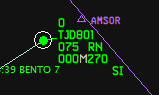
Just like real-world software used by italian controllers, a subtle circle is drawn around selected traffic to help identify it during busy sessions.
¶ 🔄 How to Update
- The plugin automatically updates itself when a new version is available, with an on-screen alert.
- Simply restart EuroScope to complete the update.
- If needed, you can manually download the latest version.
If the autoupdater isn’t functioning correctly (e.g., it keeps prompting for updates), go to the plugin directory, delete the old VCP.dll file, and rename VCP_New.dll to VCP.dll.
Switching from/to dev or release build requires a manual update
¶ 🧪 Commands
Use these in the EuroScope command bar:
.vatita reloadsettings– Reloadssettings.txtand prints a dump of its content..vatita version– Checks if your sector file and plugin version are up to date..vatita ehs- Opens Mode S list
¶ 🌥️ QNH Bar
The QNH bar helps controllers keep the latest QNH and transition level always visible, based on the active position or sector.

¶ Displayed Information
- Current UTC time
- QNH
- Transition Level
- Selected airport
¶ Airport Selection
The airport can appear either as a specific ICAO code or as GLOB.
GLOB corresponds to predefined reference airports:
LIP_→LIPZLIM_→LIMCLIR_→LIRFLIB_→LIBD
Clicking on the selected airport (either GLOB or a specific ICAO) opens a popup where you can choose an airport based on your sector (e.g. EW0 → LIEO).
¶ Controls
At the bottom of the popup, you’ll find:
QNH MIN– Automatically selects the lowest available QNH (only works if the selected sector is notAWY)Enter– Confirms your selectionCancel– Closes the window without applying changes
¶ Updating QNH
To update the QNH, simply select an airport or GLOB and click Enter.
¶ 🛠️ Support
Encountering a bug or crash?
Please open a support ticket in our Discord server. Include any logs (including update logs if required) - found at Euroscope/LIXX/Plugins/VATITA Controller Plugin/ - or error messages if possible: it helps us fix things faster!